How to Generate AI Photos in veongen.ai
How to Generate AI Photos in veongen.ai
1. Generating Photos from Text
Select a neural network model. We recommend using the Nano Banana PRO model.
In the prompt input field, describe in detail what you want to see in the photo. If necessary, you can upload your own photo.
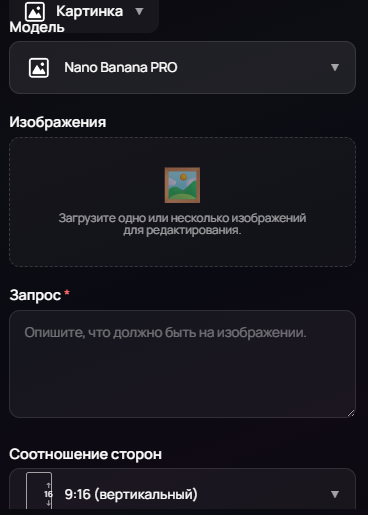
Click Generate. You can also choose orientation and style, or leave the default values.
2. Generating Photos from another Photo (Reference)
Select the neural network model you want to use.
Find and download a photo you want to replicate, for example, from Pinterest.
In the prompt input field, click the Upload Example button.
Upload the downloaded photo and your own.
As a result, the style, pose, and colors will be as close as possible to the original photo, but with your face.
Tip: For the best results, choose photos where people have a similar appearance to you.
3. Ready-made AI Photoshoots
Go to the Home tab.
Select a template you like and click on it.
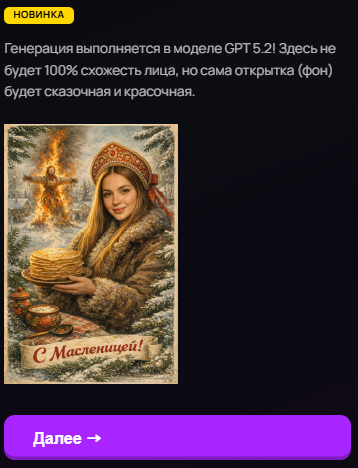
In the opened window, click Next.

Then upload your photo and click Generate.
Conclusion
Generating AI photos in VeoGen.AI is a simple and convenient way to create unique images of yourself. You can experiment with text prompts, upload reference photos, or choose ready-made photoshoots. Try different methods and find the one that suits you best.