How to Animate Photos with AI

How to Animate Photos with AI
Now, animating a photo is easier than ever. Facee allows you to create a short video even from your existing photos, without prior generation. This could be an archival shot, a photo with a partner, a child, or a portrait taken with a phone.
Below are instructions for two methods:
- Animating a Real Photo
- Creating a Video from an AI-Generated Image
Animate Your Real Photo
Now you can upload any photo and turn it into a short video. This is especially convenient if you already have a favorite image you want to "bring to life" — for example, by adding a smile, an expressive gaze, or a slight camera movement.
Step-by-Step Instructions
-
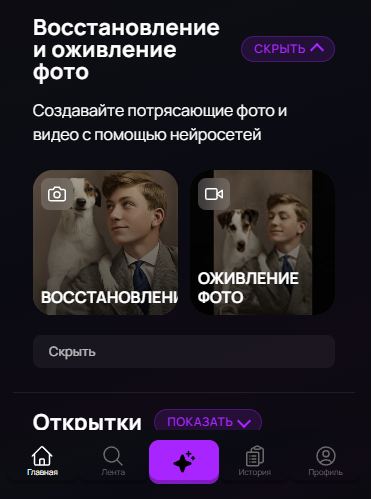
To animate a video using your own photo, scroll down on the main page and find the template "Photo Animation".
-
Click on it, and in the opened window, select "Next".
-
Upload your photo.
-
After uploading your photo, click "Generate" — in just a few seconds, the neural network will add smooth movements, emotions, and facial animation to the picture.

Result
In a few moments, you will see your photo come to life. This will be a short video created based on the image and the chosen animation.
Tip: Choose photos with a clearly visible face and good lighting — this will make the animation more natural and realistic.
Download and Share
Save the finished video in MP4 format — you can immediately post it on social media, send it to friends, or use it for Reels and stories.
That's it! Now you know how to animate photos with AI — whether it's your favorite photograph or a completely new image. Experiment and create videos that are indistinguishable from real ones.